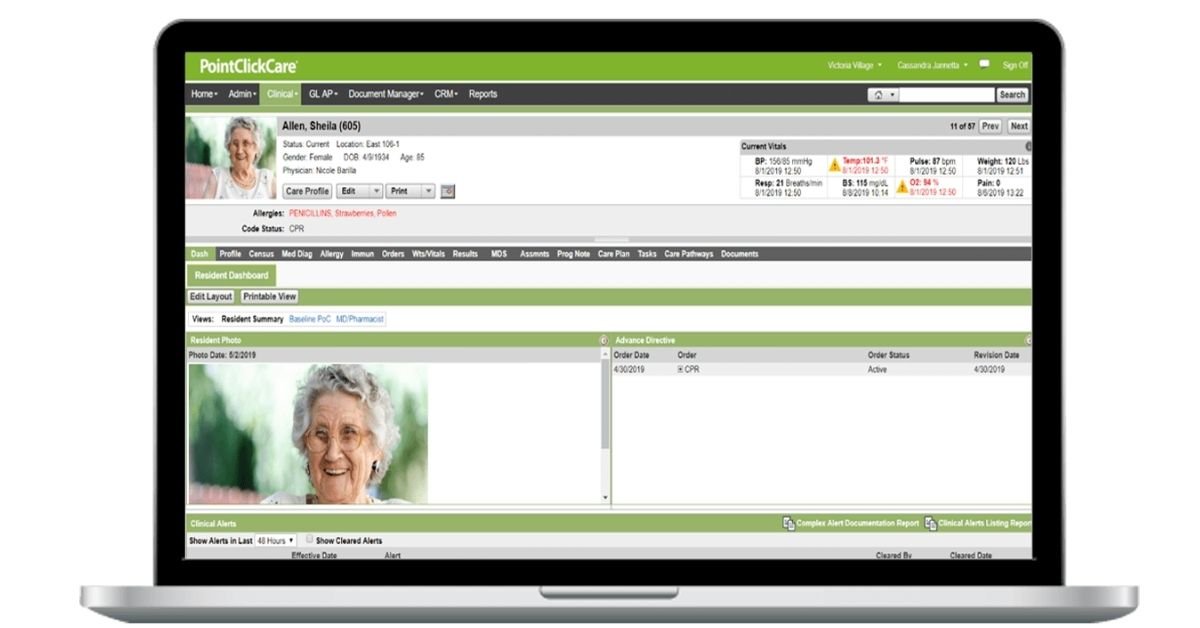
PCC skilled nursing usually refers to PointClickCare, a healthcare software platform used by skilled nursing facilities to manage electronic health records (EHRs), clinical documentation, care coordination, and other facility workflows. If you’re trying to access your account, start with the official PointClickCare login directory or the PointClickCare Point of Care (POC) login portal. The correct portal depends on your role and your facility’s setup.
This guide explains how PCC skilled nursing works, where to find official login options, how to approach common sign-in problems, and what the software can help facilities manage.
What Is PCC Skilled Nursing?
PCC stands for PointClickCare in this context. It is a healthcare technology platform that supports skilled nursing facilities (SNFs) and other care providers with electronic records, clinical workflows, care coordination, and operational tools.
A skilled nursing facility provides nursing and rehabilitation services to people who need ongoing medical care or support following an illness, injury, hospitalization, or change in health. Staff need reliable access to resident information so they can carry out assigned responsibilities and document care according to facility procedures.
PointClickCare’s skilled nursing EHR brings together clinical information and related workflows. Depending on the products and permissions a facility uses, these workflows may include resident records, vital signs, care documentation, medication and treatment administration, communication, admissions, reporting, and billing.
PCC is not simply a login page. It is the broader software environment. The Point of Care module, commonly shortened to POC, is associated with documenting care at the point where it is delivered. The screens and available functions can vary by facility configuration, role, and licensed products.
For product details, visit the official PointClickCare Skilled Nursing EHR page.
PCC Skilled Nursing Login: Official Access Links
If you already work at a facility that uses PointClickCare, use the login route provided by your employer. These official links can help you locate the appropriate destination.
| Resource | Best for |
|---|---|
| PointClickCare customer login directory | Finding the relevant customer login option |
| PointClickCare POC login | Users whose facility directs them to the Point of Care portal |
| PointClickCare Central login | Users who have been directed to the Central login page |
| PointClickCare customer support | Finding official help with access or product issues |
Important: These are different access destinations, not interchangeable links for every user. If your facility provides a bookmarked portal or a specific login address, follow its instructions.
How to Log In to PointClickCare
The exact steps depend on the portal and your organization’s configuration. In general, follow this process:
- Open the login page your facility has approved.
- Enter the information requested by that portal. The POC page, for example, asks for an organization code, username, and password.
- Check the spelling of your username and organization code.
- Enter your password carefully. Passwords are case-sensitive.
- Submit the form and follow any additional authentication instructions shown to you.
- Confirm that you’re accessing the correct facility and account before beginning your work.
If you cannot sign in, avoid repeated guesses or using someone else’s account. Contact your facility’s authorized administrator or IT help desk for assistance.
What Is PointClickCare POC?
POC means Point of Care. In a skilled nursing environment, point-of-care documentation refers to recording information where care is delivered rather than relying entirely on notes written later.
Depending on the facility’s setup and the employee’s role, point-of-care workflows may support tasks such as recording activities of daily living (ADLs), documenting assigned care, and entering observations or vital signs.
For example, a certified nursing assistant (CNA) may need to document an assigned care task after completing it. A nurse may review relevant information, assess a change in a resident’s condition, or complete a different part of the clinical record. These are general workflow examples, not instructions for a specific PCC screen.
The practical value of digital point-of-care documentation is that information can be recorded within the designated system and made available to authorized team members according to its workflow and permissions.
Staff must still follow facility policy. A completed electronic entry does not replace the need to report urgent concerns, follow clinical instructions, or correct documentation errors through the approved process.
Common PCC Skilled Nursing Login Problems
A failed login can interrupt a shift, delay documentation, and create unnecessary stress. The most useful approach is to identify the type of problem instead of trying random fixes.
PointClickCare’s official customer support page lists several potential causes of sign-in problems, including incorrect credentials, case sensitivity, browser or cache issues, internet or performance problems, and IP address restrictions.
| Problem | What to check | Recommended next step |
|---|---|---|
| Username or password is rejected | Check spelling, capitalization, and the credentials issued to you | Contact your facility administrator if the details still fail |
| Organization code is missing or rejected | Confirm that you’re using the code supplied for your facility and the correct portal | Ask your supervisor or authorized administrator to verify the access details |
| Login worked before but fails now | Consider whether credentials, permissions, or access configuration have changed | Contact the facility’s IT help desk or security administrator |
| Access fails on one network or location | The facility may have network or IP access restrictions | Ask IT to verify the approved connection and access configuration |
| Page will not load or behaves unexpectedly | Check your connection and try the browser troubleshooting steps approved by IT | Report persistent issues to your help desk |
| You forgot your password | Don’t try another employee’s credentials | Follow your facility’s authorized password-reset process |
Who Can Reset a PointClickCare Password?
PointClickCare’s support guidance states that facility sign-in and password issues generally need to be handled by the organization’s security administrator. Its support team does not directly reset facility user passwords in the situations described in its sign-in FAQ.
If you’ve forgotten your password, contact your facility security administrator, IT department, help desk, or on-duty supervisor. The person responsible for your account can explain the process that applies to your organization.
Do not send your password through email, chat, or an unverified support website. Never share resident information to prove that you work at a facility.
What If the Login Says Your Current Location Is Not Valid?
PointClickCare identifies network and IP address restrictions as one possible reason for a location-related login error. Your facility may have configuration rules that limit where accounts can sign in.
First, confirm that you’re using the correct network and official portal. If the problem continues, ask your IT team to review the facility’s access configuration. Avoid using unapproved workarounds or personal tools to bypass security controls.
Main Features of PointClickCare for Skilled Nursing Facilities
PointClickCare offers a broader set of tools than point-of-care documentation alone. The available features depend on the products and packages a facility has implemented.
1. Electronic Health Records and Clinical Documentation
An electronic health record stores clinical information in a digital format. In skilled nursing, authorized users may work with resident records, diagnoses, clinical notes, assessments, and other documentation needed for care.
A well-managed documentation workflow helps staff find relevant information and follow the facility’s processes for completing, reviewing, and correcting records. It does not eliminate the need for accurate entries or professional judgment.
2. Activities of Daily Living and Vital Signs
ADLs are routine activities such as eating, bathing, dressing, toileting, and mobility. Depending on the workflow, staff may record relevant care activities and observations in a point-of-care or other designated system.
Vital signs are measurements used to assess aspects of a person’s condition. Staff should record measurements according to their role, training, facility policy, and the system’s designated fields.
Accuracy matters more than speed. Staff should not guess missing values, copy an observation from another resident, or mark a task complete before it has been completed.
3. Medication and Treatment Workflows
PointClickCare’s skilled nursing platform describes mobile-enabled medication and treatment administration capabilities. Facilities may also use integrated medication management and pharmacy-related products.
These tools can support medication-related workflows, but staff must follow the facility’s authorized procedures, professional responsibilities, and applicable safety checks. Product availability and the exact steps used may vary.
4. Care Plans and Care Coordination
Care coordination involves sharing relevant information among authorized people involved in a resident’s care. Depending on the system configuration, electronic records and communication tools can help care teams work from more consistent information.
For example, a change in a resident’s condition may require a staff member to document an observation and report it through the facility’s designated process. The electronic record supports the workflow; it does not replace direct communication or urgent escalation when required.
5. Admissions and Transitions of Care
A resident’s move into or out of a facility can involve clinical information, medication lists, assessments, and communication with outside providers. PointClickCare describes capabilities designed to support transitions and information exchange across care settings.
Accurate information transfer can help teams prepare for a resident’s arrival and coordinate ongoing care. Facilities should confirm which integrations and exchange functions are available in their own environment.
6. Reporting, Operations, and Billing
Skilled nursing software can also support administrative work, including reporting, financial workflows, claims, and reimbursement processes. PointClickCare offers separate solutions and packages for areas such as performance insights and billing intelligence.
These capabilities are particularly relevant to administrators and billing teams. They should not be confused with the daily charting functions used by bedside staff.
For the official feature list, consult the PointClickCare Skilled Nursing Platform.
How CNAs Use PointClickCare for Charting
A CNA charting system helps staff document assigned daily care. The exact tasks and screens available in PointClickCare depend on the facility’s workflow, configuration, and the user’s permissions.
A general documentation process may look like this:
- Review the assigned tasks and relevant instructions.
- Provide the care required by the resident’s plan and facility procedures.
- Record the completed task or required observation in the designated system.
- Verify that the entry reflects what actually happened.
- Report a change in condition or an urgent concern through the appropriate clinical process.
- Follow the facility’s correction procedure if an entry needs to be amended.
This example describes general documentation principles, not a verified sequence of buttons in PCC.
Good Documentation Practices
Be accurate, timely, and factual. Use the appropriate record and document only what you observed or completed. If a task could not be completed, follow the facility’s process for documenting the reason and notifying the responsible team member.
Do not share logins or record care under another employee’s account. If the system is unavailable, use only the downtime procedure approved by your facility, then follow its instructions for handling the documentation afterward.
For a broader explanation of CNA charting systems, read PointClickCare’s CNA charting systems guide.
PCC Skilled Nursing Software for Administrators
Facility leaders evaluating PointClickCare need to look beyond the login experience. The central question is whether the software and its available modules fit the organization’s clinical, operational, financial, and technical requirements.
Before choosing or expanding an EHR, consider these areas:
Clinical workflow fit. Can staff find the information they need and complete their assigned documentation? Map the real workflow before deciding which features are essential.
Training and adoption. Staff need role-appropriate training and a clear way to report problems. A technically successful implementation can still struggle if employees do not understand the process.
Interoperability. Ask which integrations are available, which data can be exchanged, and whether additional configuration or contracts are required.
Reporting and operations. Identify the measures administrators need to monitor. Confirm how the platform supports those reports and whether the relevant features are included in the facility’s package.
Security and permissions. Review how accounts are created, changed, and removed; who manages access; and how the organization handles staff turnover and access reviews.
Implementation and support. Ask about migration, training, technical requirements, ongoing support, and the responsibilities of your facility’s team.
The best evaluation starts with your facility’s needs, not a list of features alone. You can explore product details and request a demonstration through the official PointClickCare skilled nursing EHR page.
Security and Privacy When Using PCC
Skilled nursing records can contain sensitive resident information. Protecting that information requires both secure technology and careful user behavior.
Use only your own authorized account. Keep your password private, lock or sign out of shared devices according to facility policy, and report suspicious activity promptly. Do not upload resident records to public websites or send confidential information through unapproved communication channels.
Facilities should manage access according to job responsibilities and their policies. They should also train staff on privacy, security, documentation, and incident reporting.
Using an EHR does not automatically make every workflow compliant. Organizations must follow applicable legal requirements, contractual obligations, and their own procedures. For HIPAA-related responsibilities, consult your organization’s privacy or compliance team and the relevant official guidance.
LEARN MORE: PointClickCare POC
Official PointClickCare Support and Training
If you need assistance, begin with the resource that matches your problem.
- Login or access issue: Contact your facility security administrator, IT help desk, or supervisor.
- Product support: Visit the official PointClickCare Customer Support page.
- General login choices: Use the PointClickCare login directory.
- Point of Care access: Use the official POC login portal if that is the route your facility provides.
- Product features: Review the skilled nursing EHR overview.
- Training and learning resources: Ask your facility administrator which PointClickCare training resources and permissions are available to your role.
PointClickCare advertises customer support availability 24 hours a day, seven days a week. Access to particular support channels and account-related actions may depend on your customer relationship and authorization.
Frequently Asked Questions About PCC Skilled Nursing
What does PCC stand for in skilled nursing?
PCC usually refers to PointClickCare, a healthcare technology platform used by skilled nursing facilities and other care providers. The platform supports electronic health records and related clinical and operational workflows.
How do I access the PCC skilled nursing login?
Start with the official PointClickCare login directory. If your facility uses the Point of Care portal, use the official POC login page. Follow the login instructions supplied by your organization.
What does POC mean in PointClickCare?
POC means Point of Care. In this context, it refers to workflows associated with documenting care where it is delivered. The available functions depend on the facility’s configuration and the user’s permissions.
What information do I need to log in to PCC POC?
The official POC login page requests an organization code, username, and password. Your facility should provide the correct credentials and explain which portal you need to use.
Why is my PointClickCare login not working?
Possible causes include an incorrect username or password, case sensitivity, expired or invalid credentials, browser or cache problems, network issues, or facility IP restrictions. Check the official PointClickCare sign-in troubleshooting guidance and contact your facility administrator or IT team if the issue remains unresolved.
Who resets a PCC skilled nursing password?
PointClickCare’s published sign-in guidance says facility account password issues must generally be handled by the organization’s security administrator. Contact your facility’s authorized administrator or IT help desk for the correct process.
Can CNAs use PointClickCare for charting?
CNAs may use the charting functions their facility has configured and authorized for their role. These workflows can involve assigned care tasks, ADLs, and observations. Staff must follow facility procedures and document only what they actually completed or observed.
Is PointClickCare an EHR?
Yes. PointClickCare offers an electronic health record platform for skilled nursing facilities. Its broader product ecosystem also includes tools for care coordination, medication-related workflows, operations, and other healthcare needs.
Does every skilled nursing facility have the same PointClickCare features?
No. Available features can depend on the facility’s products, configuration, integrations, permissions, and internal policies. Ask your administrator or PointClickCare representative to confirm which functions are available in your organization.
Where can I find official PointClickCare training?
Start by asking your facility administrator which training resources are available to you. PointClickCare also provides customer resources and learning opportunities through its official website and customer community.
Final Thoughts
PCC skilled nursing generally refers to PointClickCare’s software for skilled nursing workflows, including electronic records, clinical documentation, and care coordination. If you need access, use the official login route provided by your facility. If you are locked out, contact the authorized facility administrator or IT team instead of trying unapproved workarounds.
For administrators evaluating the platform, focus on clinical workflow fit, staff training, integrations, security, reporting, and the specific products your facility needs. Start with the official PointClickCare resources to confirm current features and support options.





1 thought on “PCC Skilled Nursing: Login, Features & Support Guide for 2026”